

This newsletter is for all Clarity HMIS users in the Cincinnati/Hamilton County CoC. Here you will find updates, reminders, and important information to help keep our data strong and secure - so we can continue strengthening services for our community. |

New STEH HMIS Director!
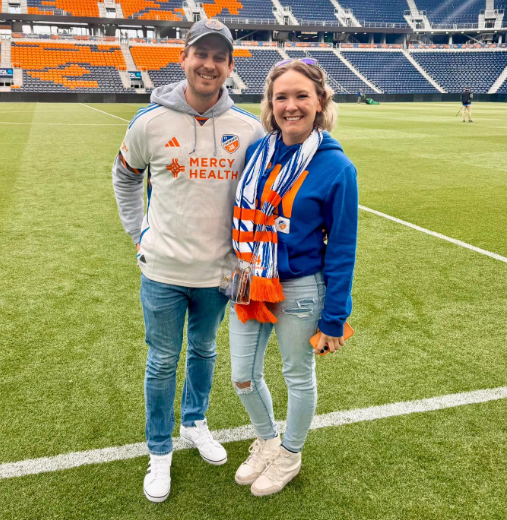
The HMIS Support Team is excited to share that Brandon Victor has joined our team as the HMIS Director!
Brandon grew up in Elyria, Ohio and moved to the Cincinnati area with his girlfriend, Chelsea, after graduating from Kent State. Brandon graduated from law school at UC in 2019 and spent the first six years of his career at Talbert House where he had multiple roles in the compliance department and with the organization's veteran programs. He enjoys visiting the many parks in the region, attending sporting events, and spending time in his backyard with his three dogs. Brandon is excited to be joining STEH and once again working directly with the community's homeless system.
 |  |

Clarity Feature Updates - April 2026
The Clarity HMIS will have some features updated on Monday, April 6 between 9:00 and 10:00am. Please let us know if you experience any issues.
Have you ever thought of a feature that you wished Clarity could do or had? Let us know! Our vendor accepts ideas and our community has had several ideas turned into active Clarity features!

Upcoming Reports
If you have a housing program, please review the client and program information for the night of the PIT: 01/22/2026
Client Information: please verify that all relevant client records (including profile demographics, enrollment/exit dates, move-in dates, and housing services) are complete and up-to-date for the PIT count date.
Program Information: please confirm that project start/end dates, available beds and units, and voucher counts are accurate.
The STEH HMIS team is reviewing and sending data correction request emails directly to agencies. Please remember if your agency uses VESTA or ETO for data collection, corrections must be completed in VESTA or ETO. Contact HMISsupport@end-homelessness.org if you have any questions or concerns
Helpful Reports for Preparing for the HIC/PIT:
- [GNRL-106] Program Roster: This report outlines program stays and relevant inventory information, based on dates you include when you run the report. The report will include a list of all clients who were enrolled, exited, or remained active during the reporting period.
- [GNRL-220] Program Details Report: This report is a detailed review of all relevant profile, enrollment, exit, and housing service data in one place.
- [HSNG-108] Housing Census: This report provides bed occupancy rates by date, with the ability to drill down and see a client list for those dates.
- [HSNG-200] Current Housing Availability: This report summarizes (by housing project type, then program name) the amount of available bed and unit inventory on the night before the report is run. This is most helpful for ensuring your program configurations are accurate.
Accurate data ensures our community receives the funding and resources it deserves. If you need a hand navigating these updates, please reach out directly to HMISsupport@end-homelessness.org. Thanks in advance for your help in making sure that our community’s data is as accurate as possible.

New "Live" HMIS Data
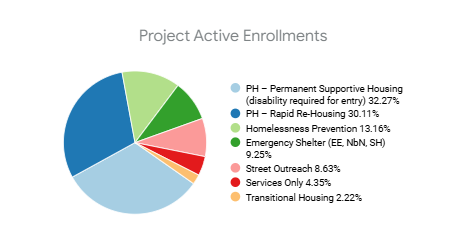
We are thrilled to announce that live HMIS Data is now available on the HMIS Resources page - found in the Cincinnati CoC community website. This is live data that shows an unofficial look at the data within HMIS. This is not official data and should not be used in any context.

Data Analysis "Save" turned off
Previously all users had the ability to create and save reports using the Explore tab in Clarity. The HMIS Support team discovered a bug that was allowing users to modify and/or delete existing reports (in the Data Analysis tab). Due to the number of reports and dashboards that our team supports, we turned off the ability for users to save and reported the issue to our vendor.

Helpful Tips: Head of Household Errors
In HMIS, the Head of Household (HoH) determines how a household is structured in reporting. Errors here can lead to (1) Incorrect household counts, (2) Inaccurate demographic reporting HUD reporting issues (especially HIC & PIT), and (3) Data quality flags in system reports.
- No Head of Household Assigned: This occurs when no head of household is selected at enrollment -or- the original HoH exits, but the designation is not updated. For more detail, check out this article: No Head of Household
- Multiple Heads of Household: This may happen when individual enrollments are merged into one enrollment. For more detail, check out this article: Too Many Heads of Household
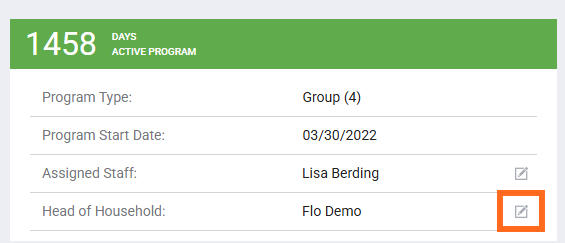
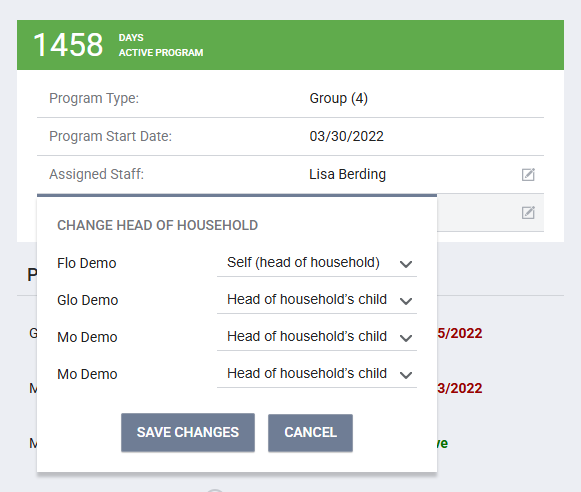
- Incorrect Person Selected as Head of Household -OR- Household members' relationships not linked to HoH: In the program enrollment, the HoH and program household can be edited by selecting the edit icon next to the HoH's name on the right. For more detail, check out this article: Missing Relationship to Head of Household :
In the program enrollment, the HoH and program household can be edited by selecting the edit icon next to the HoH's name on the right.
 |  |

Looking for HMIS Documents?
HMIS Resources - including policies and forms - can be found in the Cincinnati CoC community website.


| Email us at HMISsupport@end-homelessness.org | Call us with HMIS Support Line: 513-263-2790 9:00am - 3:00pm Monday-Friday (excluding holidays) | Visit the HMIS Support Knowledge base for the most up-to-date Clarity Support Articles |