

The information bar is a set of icons located in the top-right corner of Clarity across all screens. Each icon in this bar has a function that is helpful either for client management or user accessibility, as well as where user profiles are located. This article will provide a brief rundown of the icons, as well as links to more in-depth articles where applicable.

The moon icon is a Dark Mode toggle. Clicking this icon will change the color palette of Clarity to a much darker one. In Dark Mode, the moon icon is replaced with a sun icon that switches the palette back to Light Mode, allowing users to match Clarity to their personal preference.

The magnifying glass opens a client search bar. While there is a dedicated client search screen with its own search bar, the one present in the information bar is visible from any other screen in Clarity, allowing caseworkers to search for clients without necessarily having to backtrack to the main search screen.
For more information on using the search bar in the new UI, check out this article.

The box with an arrow facing outward is the Switch Interface button. At the time of this article's publication, this is how users are able to swap between the new UI and the original UI. While working in the original UI may feel more comfortable at points, the Strategies to End Homelessness HMIS team recommends switching into the new UI and getting familiar with it when possible. The new UI will be considered fully released on October 1st, 2026, with the original UI being completely sunset and no longer accessible a few days later on October 6th, 2026.

The envelope icon is the message inbox and should look familiar to users trained in the original interface, as it was present there as well. The inbox is the system used in Clarity to allow caseworkers to send and receive secure messages. For example, caseworkers working with referrals will receive notifications about new referrals through this inbox. The icon will also display a number in red denoting how many new messages have been received.
**Messaging other caseworkers through the Clarity inbox is the only way in which it is appropriate to openly discuss client PII as it is encrypted.
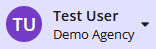
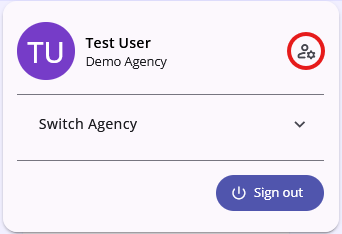
Lastly,clicking on the profile image and staff member name opens a sub-menu that allows users with access to more than one agency to freely switch between them, as well as review and update certain user specific settings.
Contact Us
If you need help, or wish to offer suggestions or feedback, please contact the Cincinnati/Hamilton County HMIS support team at HMISsupport@end-homelessness.org or by calling 513-263-2790 9:00a.m. - 3:00p.m. Monday-Friday (excluding holidays).
When contacting HMIS Support about a particular client, please do not send protected personal information (PII) such as full name, social security number, or any other information used to determine a person's identity through email. Instead, please send the Clarity Unique Identifier found on the client's Clarity Profile page. You can use the messaging system in Clarity if you need to send personally-identifying information.