

This newsletter is for all Clarity HMIS users in the Cincinnati/Hamilton County CoC. Here you will find updates, reminders, and important information to help keep our data strong and secure - so we can continue strengthening services for our community. View current and past CIN HMIS Support Updates. |
Clarity Feature Updates - June 2026
The Clarity HMIS and the data analysis tool will be updated on June 16 between 9:00 and 10:00am. This may affect reports in the Data Analysis tab in Clarity. Please let us know if you experience any issues. Some of the features that we think are notable for our community:
- Auth0 Authentication - updating the login screen and enhancing authentication for increased security. Auth0 for Clarity Human Services: Toolkit
- New DIT and API processes - updated to streamline data imports
JUST ANNOUNCED: THE NEW USER INTERFACE GOES LIVE FOR ALL USERS OCTOBER 1, 2026! |
New UI Spotlight: Editing a Screen
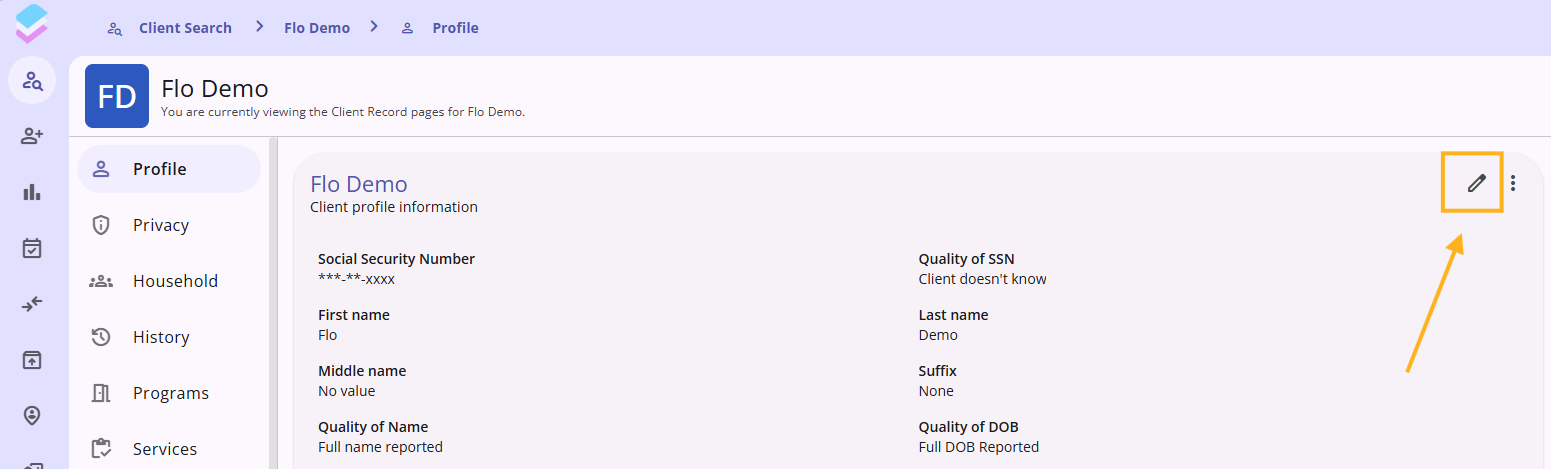
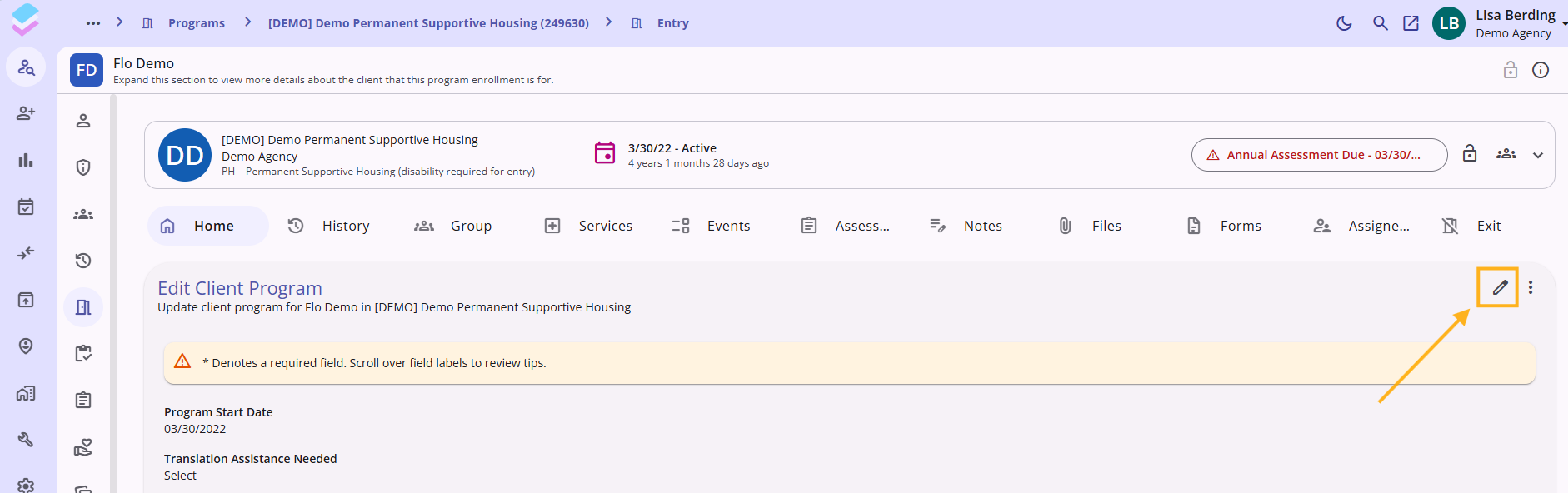
The new Clarity User Interface requires an extra step to edit existing screens. Once on the screen - look for the pencil icon - which is usually on the right. Click on the pencil icon.
For more information, check out this article: Clarity's New Interface: Weekly Release Notes or view all our New UI articles in our knowledgebase here: Solutions : We highly encourage all users to familiarize themselves in the new interface. If you experience any bugs or glitches, please let us know right away so that we can report all issues to our vendor, Bitfocus.
LAST CALL: We need your feedback!
We are requesting feedback on our current HMIS Software and Vendor. Please complete the embedded feedback form below or click this link: HMIS User Satisfaction & System Review Survey (2026) – Fill out form
This feedback for is only for your experience with Clarity HMIS. If you would like to leave feedback for the STEH HMIS Support team, please do so here: STEH HMIS 2025 Training and Support Feedback – Fill out form
Data Analysis "Save" turned off
In February the HMIS Support team discovered a bug that was allowing users to modify and/or delete existing reports and dashboards (in the Data Analysis tab). Due to the number of reports and dashboards that our team supports, we turned off the ability for users to save and reported the issue to our vendor. Previously all users had the ability to create and save reports using the Explore tab in Clarity.
Helpful Data Quality Tips: Status Update Assessment
Status Update Assessments should be completed any time there is a status or situation change for a participant or household. Some projects also require more frequent updates - please check with your supervisor. A situation change could include:
- Disabling Conditions and Challenges
- Health and Wellness (including Health Insurance)
- Employment
- Income from Any Source
- Non-Cash Benefits
Status Update Assessments ensure better/more accurate data quality, provide better service coordination, measures participant progress - all information that directly impacts not only agency-level data, but community-wide data.
For more information, please see this article: Status Update Assessment :
HMIS Support Holiday Hours
Please note our offices (including the HMIS Support Line and Help Desk) will be closed Friday, June 19th and will reopen Monday, June 22nd.

| Email us at HMISsupport@end-homelessness.org | Call us with HMIS Support Line: 513-263-2790 9:00am - 3:00pm Monday-Friday (excluding holidays) | Visit the HMIS Support Knowledge base for the most up-to-date Clarity Support Articles or Cincinnati CoC community website for HMIS Policies. |