
The Housing Stabilization Collaborative (also known as Impact Award) provides eviction prevention services to families who have been identified as at-risk for eviction but have not yet received an eviction notice. HSC operates by proactively reaching out and providing services to prevent eviction and support the family to regain housing stability. To that end, there are multiple assessments and services within Clarity to help document and guide these families through the system.
This article will details the three most common forms of progress tracking, and when they should be completed.
- Contact Form
- Focus Area Assessment Note
- Case Note
Contact Form
The Contact Form is a client-level navigation tab assessment. It is used to document each contact with a client and the outcome of that contact.
A Contact Form should be completed for all communication attempts prior to enrollment.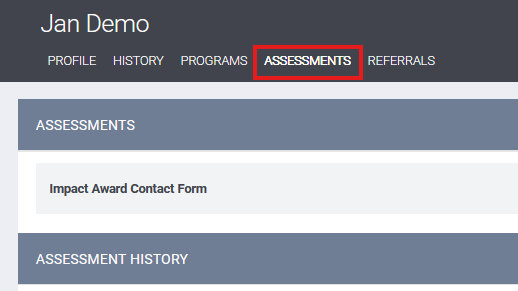
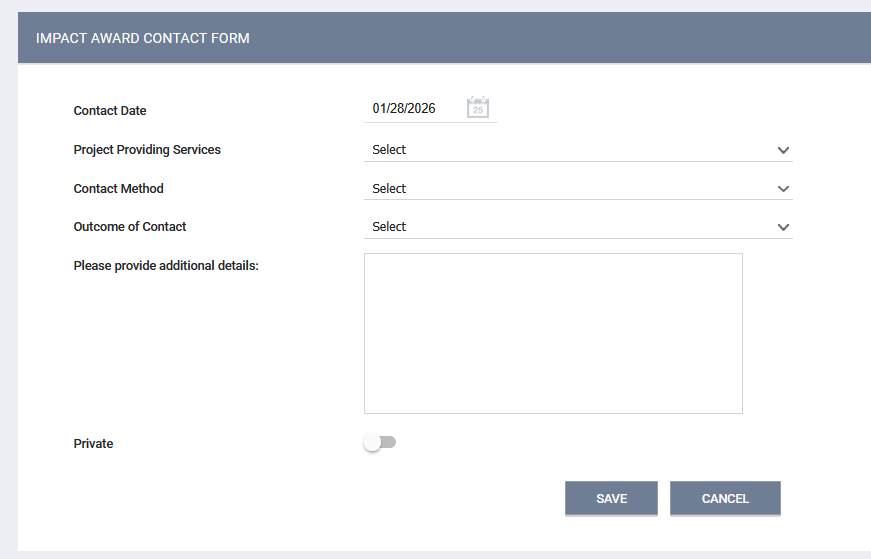
- Contact Date: Document the date that contact was attempted.
- Project Providing Services: Select Impact Award program that attempted/made contact; BHS, FHIFN, or LYS
- Contact Method: Select the type of contact attempted in the dropdown list:
- Phone Call
- Text Message
- In Person
- Other
- If multiple forms of contact were attempted, a Contact Form should be completed for each.
- Outcome of Contact: Choose the most accurate description of the resolution of the attempt from the dropdown list:
- Contact information not good (phone out of service, email bounced, wrong number)
- Client did not respond/answer
- Client declined services
- Left message (text, email, voicemail)
- Client agreed to program, intake scheduled
- Client no show, intake rescheduled
- Client no show, intake not rescheduled
- Client unsure about participating in program
- Unable to leave message
- Unable to reach after multiple attempts
- Not eligible: Client is homeless, referred to CAP
- Not eligible: Client is currently in housing project
- Not eligible: Client under eviction not eligible for project
- Other
- Additional Details: Provide any other relevant information relating to the contact attempt. For example, the time and place of an in-person meeting.
Focus Area Note
Focus Area Assessments are HSC-specific program-level assessments that are used to document "action pathways" and clients' progress towards meeting actionable steps related to those pathways.
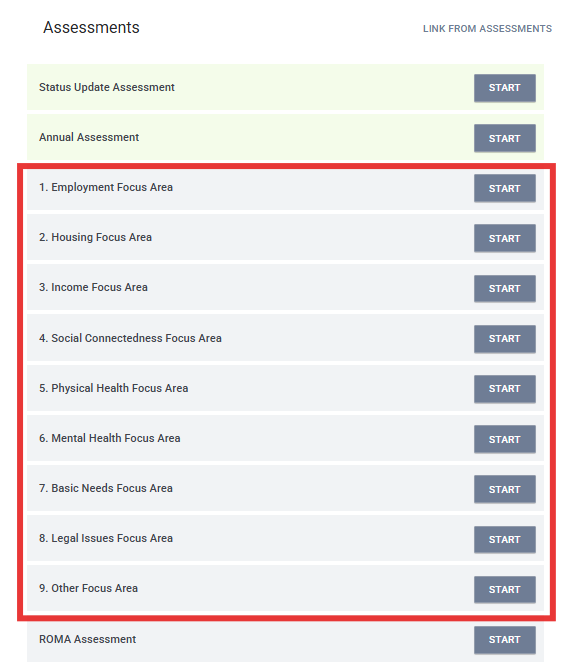
Each Focus Area Assessment requires identical data fields:
(Example 1)
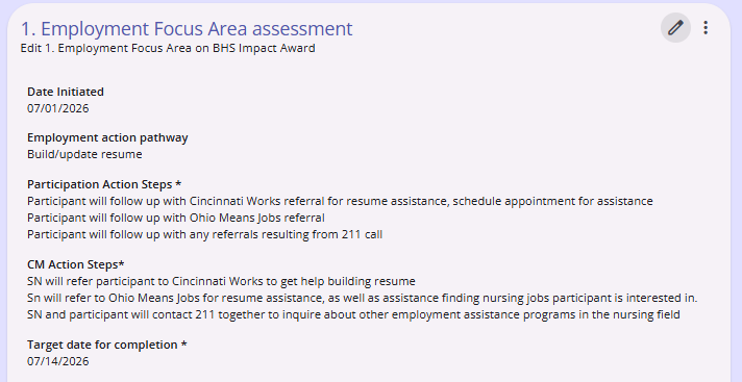
(Example 2)
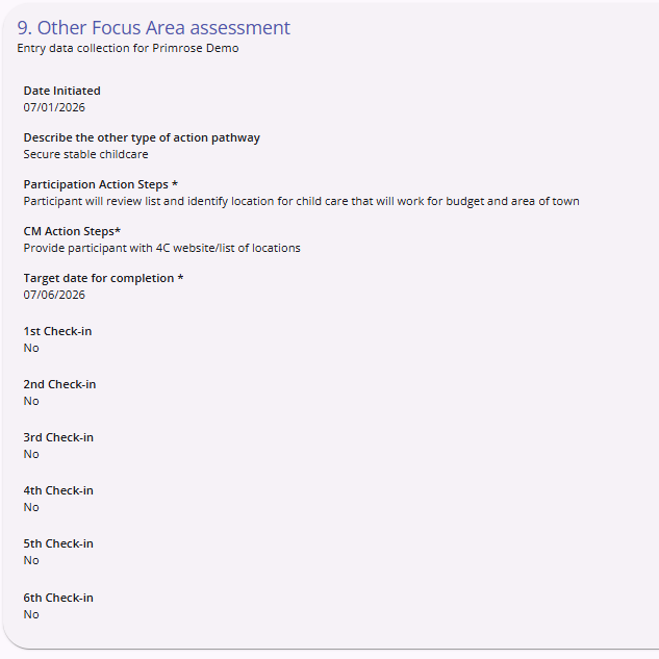
- Date Initiated: The date the Focus Area plan was initiated.
- Action Pathway: This will be a list of potential goals specific to the Focus Area selected. Choose the most relevant option from the dropdown menu.
- Participation Action Steps: Describe the steps the client will complete to further or meet the chosen goal.
- CM Action Steps: Describe the steps the case manager will take to assist the client in furthering or meeting the chosen goal.
- Target Date for Completion: Set the date the goal is expected to be met.
- Check-in: Check-ins are performed on revisits to Focus Areas to document progress towards goals. For each check-in, users will turn on the relevant check-in toggle (1st check-in, 2nd, etc.) to enter in the date the check was completed, assign a numerical value, and fill in a required Notes section with additional details.
- 0-2 not started
- 3-4 started but no progress to report
- 5-6 some progress made
- 7-8 good progress made but not yet achieved
- 9-10 achieved/completed
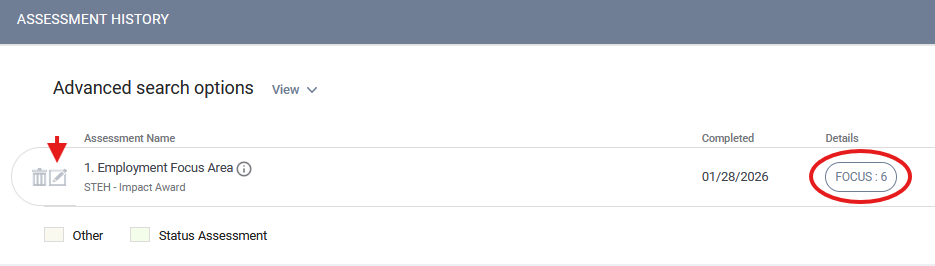
Check-ins should be completed during bi-weekly check-ins by clicking the edit icon next to the relevant Focus Area assessment from the Assessments history tab. Case managers are also able to see the "focus score" given to the Focus Area from the program-level assessments tab in the History section. The focus score will reflect the highest check-in status entered thus far.
Case Management Service
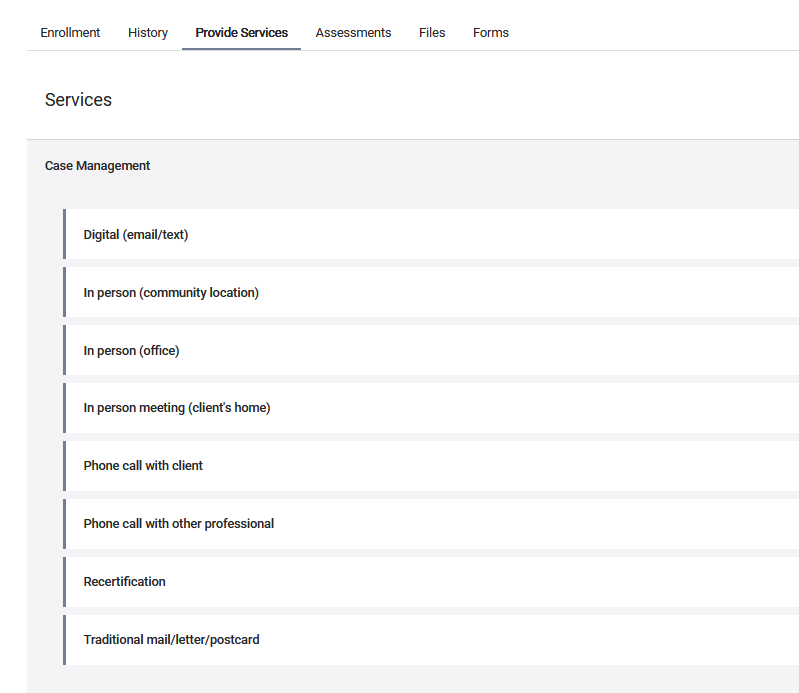
The Case Management Service is completed for every bi-weekly conversations with the client.
Go to the program-level Provide Services tab and click on the "Case Management" option to expand it. Choose the sub-type that best describes the type of interaction that took place. Digital or in-person? If in-person, where?
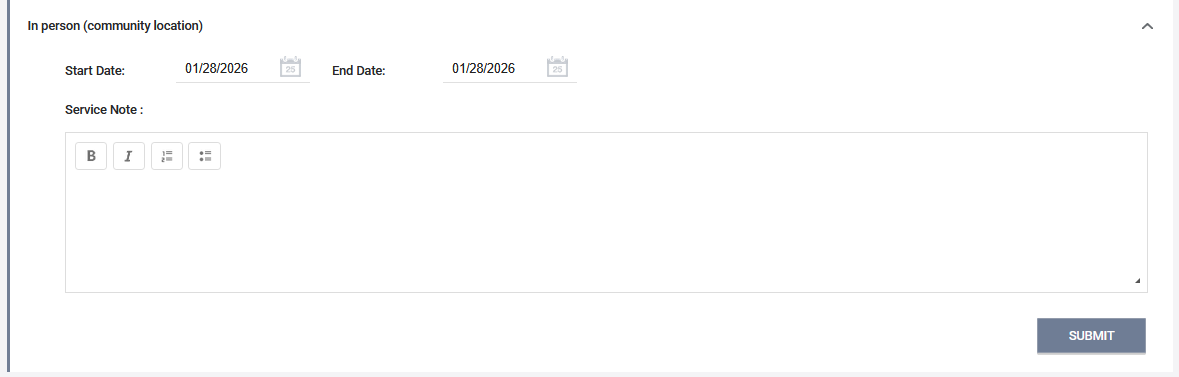
From there, fill in the date the service was provided (the start and end dates should be the same), enter any relevant information in the notes field, and click SUBMIT. The services can be viewed from both the program and client-level History tabs.
Contact Us
If you need help, or wish to offer suggestions or feedback, please contact the Cincinnati/Hamilton County HMIS support team at HMISsupport@end-homelessness.org or by calling 513-263-2790 9:00a.m. - 3:00p.m. Monday-Friday (excluding holidays).
When contacting HMIS Support about a particular client, please do not send protected personal information (PPI) such as full name, social security number, or any other information used to determine a person's identity through email. Instead, please send the Clarity Unique Identifier found on the client's Clarity Profile page. You can use the messaging system in Clarity if you need to send personally-identifying information.