
RentConnect is the name of Strategies to End Homelessness' program - led by the Property Owner Engagement Management team (POEM) which connects local property owners with CoC supportive housing programs. RentConnect is available to partner agencies in the Cincinnati/Hamilton County CoC who operate CoC funded housing projects.
Padmission is the marketing platform used in RentConnect, functioning similar to Zillow. Property owners list their available units in Padmission for case managers and housing specialists to look through with their clients. Agency staff are given access to Padmission after completing an onboarding. Clients currently do not have their own access to Padmission, but plans are underway for a client "view-only" access.
When an agency joins:
- The agency has agreed to provide RentConnect with a list of property owners, who they work with.
- The property owners are entered as "leads" in Padmission, and are contacted by the RentConnect team to see if they are interested in joining.
- The property owner decides of they would like to list their units in Padmission or not.
Documenting Padmission Units in Clarity
PSH and RRH program enrollments screens include data fields in the CLIENT ADDRESS section about whether or not the unit was identified via Padmission.
These fields are dependent on the housing move-in date. At the bottom of the section, it asks of this unit exists within the Padmission platform. If yes, the system will additionally require the name of the property owner. If you are unsure if the unit was listed in Padmission, please do a search in Padmission to check or reach out to the RentConnect team to check.
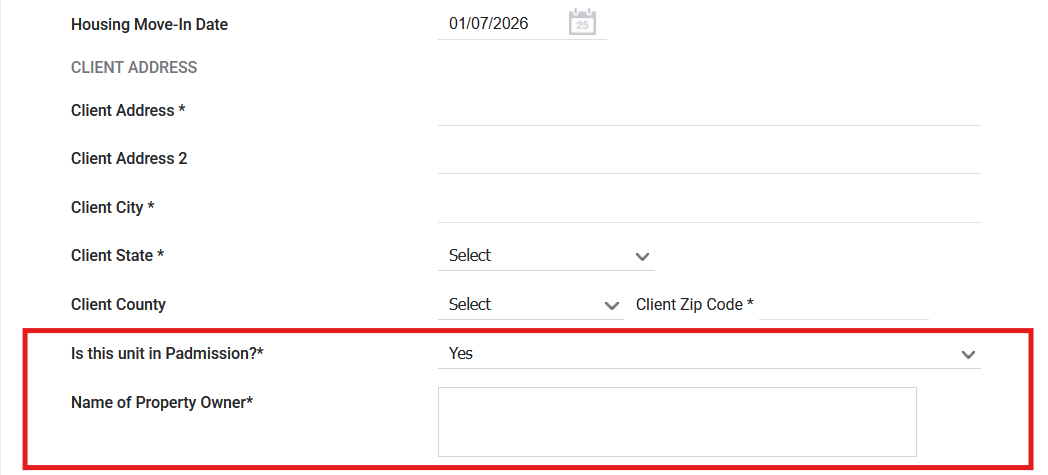
IMPORTANT NOTE: If the client was initially housed with a Padmission unit and has moved during the enrollment, DO NOT edit the enrollment housing move-in date. Complete either a Status Update Assessment, or a Rental Update Assessment with the new address and Padmission information. Both of these assessments are found in the program-level navigation Assessments tab.
In a Status Update Assessment, the first data field in the Client Address section asks: "Has the client moved to a new unit since the last update?" After selecting yes in that field, the question "Is this unit in Padmission" will appear at the bottom of the Client Address section. Answering yes will make the "Name of Property Owner" data field visible.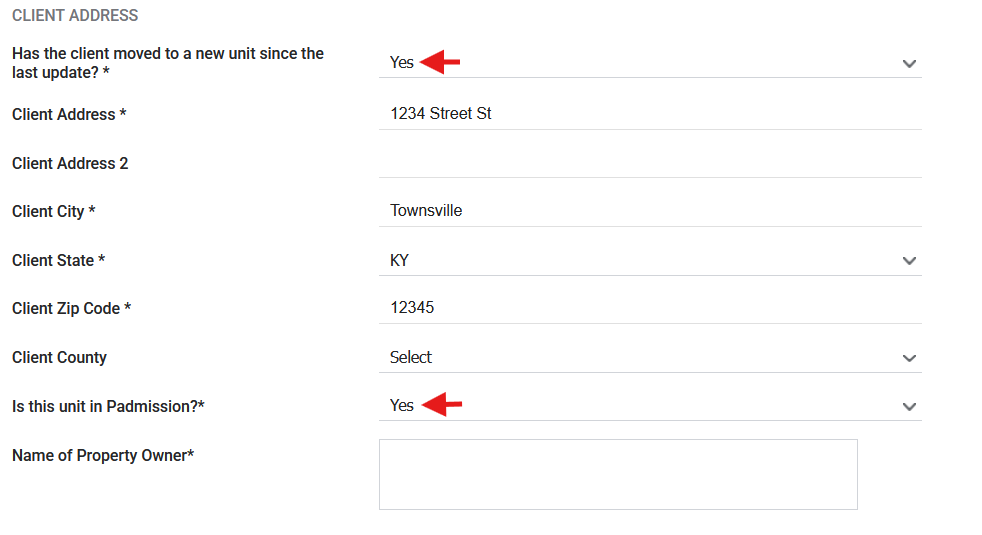
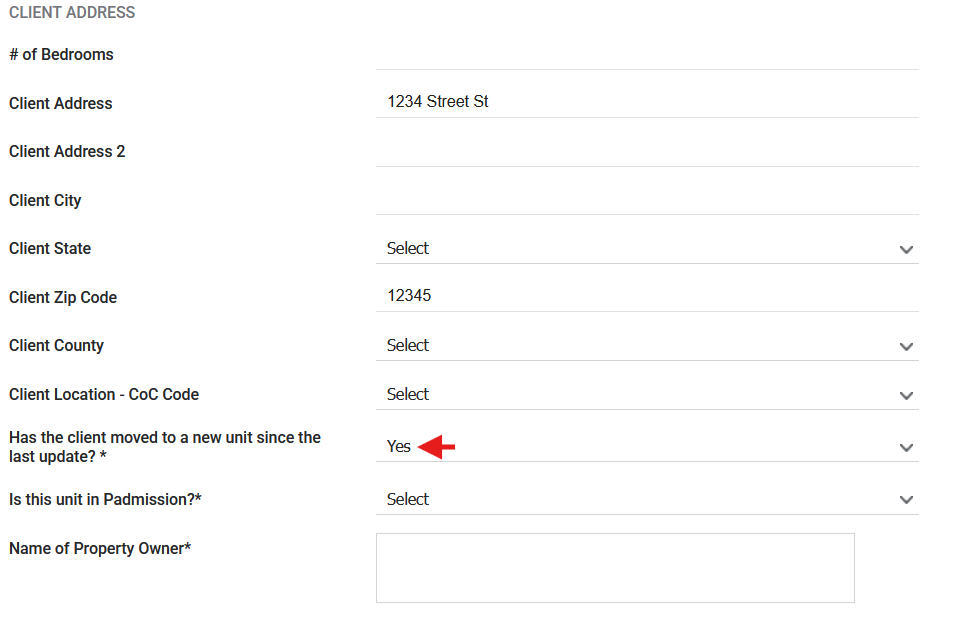
In a Rental Update Assessment, the data field "Has the client moved to a new unit since the last update" appears at the bottom of the Client Address section. Selecting yes prompts the "Is this unit in Padmission" field to appear directly beneath. This is true for both Rental Update Assessments, and Rental Update (w/accounts) Assessments.
Contact Us
If you need help, or wish to offer suggestions or feedback, please contact the Cincinnati/Hamilton County HMIS support team at HMISsupport@end-homelessness.org or by calling 513-263-2790 9:00a.m. - 3:00p.m. Monday-Friday (excluding holidays).
When contacting HMIS Support about a particular client, please do not send protected personal information (PPI) such as full name, social security number, or any other information used to determine a person's identity through email. Instead, please send the Clarity Unique Identifier found on the client's Clarity Profile page. You can use the messaging system in Clarity if you need to send personally-identifying information.